Docs Account
Plans and billing
What each plan includes, what an address lookup is, and how to upgrade, change or cancel your plan.
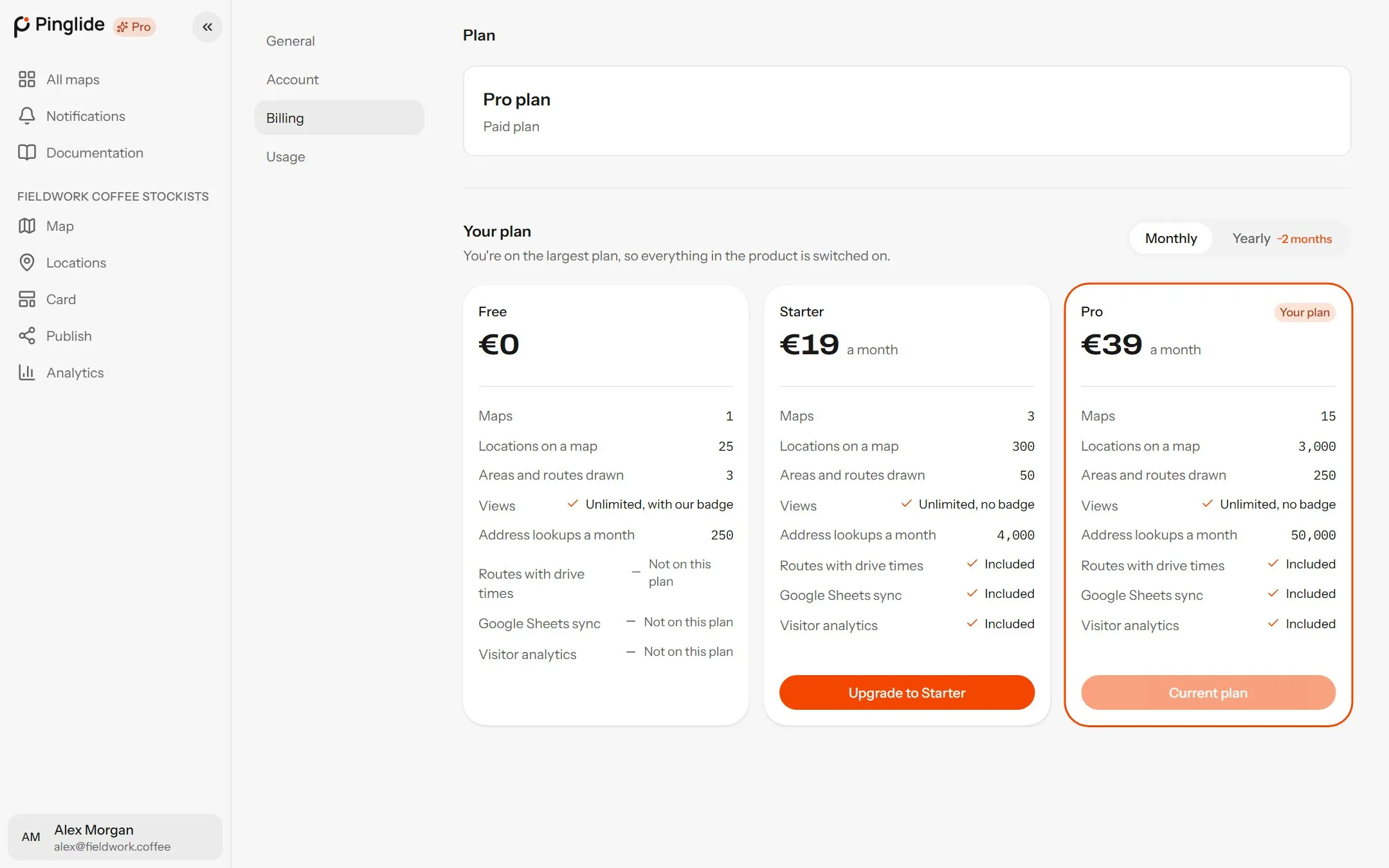
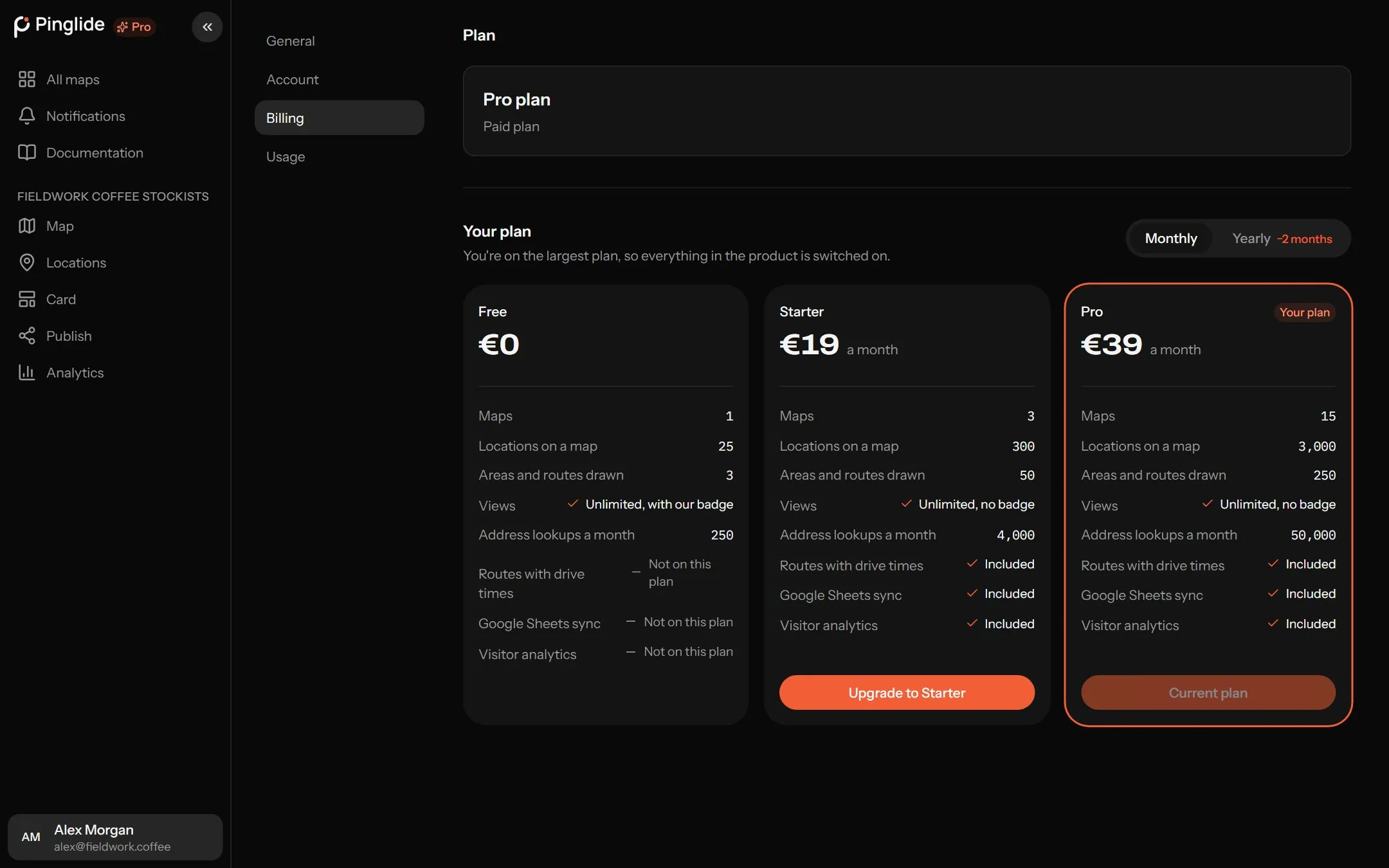
The plans
#| Free | Starter | Pro | |
|---|---|---|---|
| Price | €0 | €19 a month, or €190 a year | €39 a month, or €390 a year |
| Maps | 1 | 3 | 15 |
| Locations on a map | 25 | 300 | 3,000 |
| Areas and routes drawn | 3 | 50 | 250 |
| Views | Unlimited | Unlimited | Unlimited |
| Address lookups a month | 250 | 4,000 | 50,000 |
| Routes with drive times | — | Included | Included |
| Google Sheets sync | — | Included | Included |
| Visitor analytics | — | Included | Included |
| “Made with Pinglide” badge | Shown | Removed | Removed |
Yearly billing gets two months free. Views are unlimited and free on every plan. On Starter and Pro the Made with Pinglide link goes the next time you publish.
What counts as a lookup
#A lookup turns one address into a point, or one point into an address. They are counted per account and reset on the 1st of each month.
| You do this | It uses |
|---|---|
| Search for an address | One lookup per search. |
| Drop or drag a pin | One, to fill in its street address. |
| Import a file | One per distinct address; rows with latitude and longitude use none. |
| Sync a Google Sheet | One per new or changed address. |
| Open the Route tool | Up to one per location, to check which ones are near a road. |
Lookups that fail on our side aren’t counted, and visitors to your map never use any.
Used them all? Searches and imports stop until the 1st, or upgrade to carry on. Address lookups are busy right now isn’t your allowance — try again in a few minutes.
Seeing what you’ve used
#Settings → Usage meters Maps, Locations (your fullest map), Areas and routes and Address lookups against your plan — amber at 75%, red at 90%. Anything that would go over is refused with a message naming the limit.
Upgrading
#
Choose a plan
Open Settings → Billing, choose Monthly or Yearly, and press Upgrade to Starter or Upgrade to Pro. Or start from the pricing page.
Pay
Our payment provider handles the payment, VAT and receipts.
Wait a few seconds
Activating your plan usually takes a few seconds.
Changing plan or billing period
#Already paying? Change plan from the Plans list in Settings → Billing, not a second checkout.
| Change | When it applies |
|---|---|
| Upgrade | Straight away. The difference is added to your next bill. |
| Downgrade | At your next renewal. Keep Pro (or Starter) cancels the change. |
| Monthly to yearly, or back | Press Switch to yearly billing or Switch to monthly billing. |
| To Free | Use Cancel plan — see below. |
Cancelling and resuming
#Press Cancel plan twice. You keep your plan to the end of the paid period, then move to Free. Resume plan before then undoes it.
Cancelling doesn’t refund the period you’ve paid for, and payments aren’t refunded except as set out in the Refund Policy. Try your map on Free first.
On Free, nothing is deleted and published maps keep working, but you can’t add past the Free limits, draw routes, sync sheets or record analytics.
Card, billing details and invoices
#- Payment method → Update changes the card — do this first if a payment failed.
- Billing details → Edit changes the billing address, tax ID and receipt email.
- Invoices lists every charge with a Download link.